


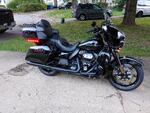
2020 Ultra Limited Digital Display

Thread Starter
|
Cruiser


Joined: Nov 2025
Posts: 100
Likes: 58
From: Virginia
 2020 Ultra Limited Digital Display
I had an interesting thing happen on my digital display. When I am in the info mode it will switch over to the radio page. No big bumps. Just switches. Sometimes it may take 30 minutes other times it will immediately switch. Anyone ever seen this? Of course, I did a google search but didn't find much other than to hold the power button and see if it resets and pretty much the next option is to take in the dealership. (Hoping to avoid that)
Unrelated... I got all the fluids changed! Also strained the oils using cheese cloth and ZERO metallic bits in there as well as the little magnet at the drain plugs. Feeling pretty good about that.
Unrelated... I got all the fluids changed! Also strained the oils using cheese cloth and ZERO metallic bits in there as well as the little magnet at the drain plugs. Feeling pretty good about that.


Thread Starter
|
Cruiser
Joined: Nov 2025
Posts: 100
Likes: 58
From: Virginia
I will google how to do that. I tried to reset it using the power/Mute button... No joy. Thanks for the input.

Seasoned HDF Member


Joined: Sep 2008
Posts: 13,905
Likes: 10,886
From: San Diego, CA
Have you updated any of the software, etc.....?
Two months ago, I purchased a used 2020 CVO ...
The Software version, the NAV version, the dealer list and the Maps were all outdated.
After a reset, it couldn't hurt to update the radio software and NAV software;
I had software version M20.19.20.01 and updated to M23.22.27.00
I had NAV version 9.35.9.155880 and updated to 9.35.10.206394
Your newest versions may be different, but I went to the update website and this was the easiest HD radio update I have ever done...
Good luck... Let us know the final fix
Two months ago, I purchased a used 2020 CVO ...
The Software version, the NAV version, the dealer list and the Maps were all outdated.
After a reset, it couldn't hurt to update the radio software and NAV software;
I had software version M20.19.20.01 and updated to M23.22.27.00
I had NAV version 9.35.9.155880 and updated to 9.35.10.206394
Your newest versions may be different, but I went to the update website and this was the easiest HD radio update I have ever done...
Good luck... Let us know the final fix
Thread Starter
|
Cruiser
Joined: Nov 2025
Posts: 100
Likes: 58
From: Virginia
Have you updated any of the software, etc.....?
Two months ago, I purchased a used 2020 CVO ...
The Software version, the NAV version, the dealer list and the Maps were all outdated.
After a reset, it couldn't hurt to update the radio software and NAV software;
I had software version M20.19.20.01 and updated to M23.22.27.00
I had NAV version 9.35.9.155880 and updated to 9.35.10.206394
Your newest versions may be different, but I went to the update website and this was the easiest HD radio update I have ever done...
Good luck... Let us know the final fix
Two months ago, I purchased a used 2020 CVO ...
The Software version, the NAV version, the dealer list and the Maps were all outdated.
After a reset, it couldn't hurt to update the radio software and NAV software;
I had software version M20.19.20.01 and updated to M23.22.27.00
I had NAV version 9.35.9.155880 and updated to 9.35.10.206394
Your newest versions may be different, but I went to the update website and this was the easiest HD radio update I have ever done...
Good luck... Let us know the final fix
That was it. I updated the software from the Harley site. I had 6 different updates and rode in to work this morning. It seems to be doing fine now. I sure am hoping I do not have to replace that unit. I am certain it wouldn't be cheap. Ride safely all.

Thread Starter
|
Cruiser
Joined: Nov 2025
Posts: 100
Likes: 58
From: Virginia
Trending Topics

Road Warrior


Joined: Dec 2016
Posts: 1,791
Likes: 867
From: Lincolnshire, IL
Personally, I'd first try to perform a full factory reset if that's something you can perform yourself. Then, without doing anything else, I'd ride it for a few days and see if it works ok. If it works fine, then I would next the programing of some radio stations....ride it for a few more days and see if it continues to be OK.
After that add some personal settings but just A COUPLE AT A TIME...each time riding for a couple of days afterwards.
In other words, SLOWLY add stuff and test in-between. Hopefully it will be fine, but if not you might be able to either identify what you did that "the system didn't like" when you take it into HD.
After that add some personal settings but just A COUPLE AT A TIME...each time riding for a couple of days afterwards.
In other words, SLOWLY add stuff and test in-between. Hopefully it will be fine, but if not you might be able to either identify what you did that "the system didn't like" when you take it into HD.

Thread
Thread Starter
Forum
Replies
Last Post