 or an attachment

Embedding Pictures

Thread Starter
|
Outstanding HDF Member
Joined: Oct 2006
Posts: 2,179
Likes: 1
From: Southern California
 Embedding Pictures
I have read the the HOW TO,,,,but do not see the "Embed Picture In Post" box to put a check mark in. If I use photo bucket,,the posts are very small...any help is appreciated.
Thread Starter
|
Outstanding HDF Member
Joined: Oct 2006
Posts: 2,179
Likes: 1
From: Southern California
I don't think so..that would be like from Photo Bucket ..etc..I wanted to Embed some .JPGs from my computer..ride pics etc...
Seasoned HDF Member

Joined: Jun 2006
Posts: 30,888
Likes: 33,095
From: King George, VA
when you copy your picture from photo bucket, paste it in the window that you type your text in. You will notice the IMG in paranthesis before and after the URL is in upper case. Change them both to lower case and it will work.
Trending Topics

Tourer
Joined: Aug 2006
Posts: 373
Likes: 0
From: indianapolis
well the photo i put on here is not from photobucket..it is from my hdf gallery..oh well i tried
HD Forum Stories
The Best of Harley-Davidson for Lifelong Riders

Jason Momoa Is Turning Classic Harleys Into PHEVs
Verdad Gallardo
Harley-Davidson Fat Boy Becomes a Dark, Decepticon-Inspired Custom
Verdad Gallardo
6 Weirdest Harley-Davidsons Ever Sold to the Public
Verdad Gallardo
7 Times Harley-Davidson Chucked Tradition Out the Window
Verdad Gallardo
7 Surprising Harley-Davidson Products that Are Not Motorcycles
Verdad Gallardo
8 Best Harley-Davidson Motorcycles Ever
Pouria Savadkouei
10 Worst Harley-Davidson Motorcycles Ever
Pouria Savadkouei
Killer Custom's Jail Break Is The Breakout That Refused to Blend In
Verdad Gallardo
Crazy Bunderbike Build Looks Amazing, But Is It Impossible to Ride?
Verdad Gallardo
Big Kahuna HDF Member
Joined: Mar 2007
Posts: 29,598
Likes: 19
From: Oregon
When you upload to photobucket there are 4 choices of code below your pic. The bottom one is called "IMG code."
Copy that IMG code and paste it right into the message, with your cursor blinking right where you want the pic.
That does it. Like this:

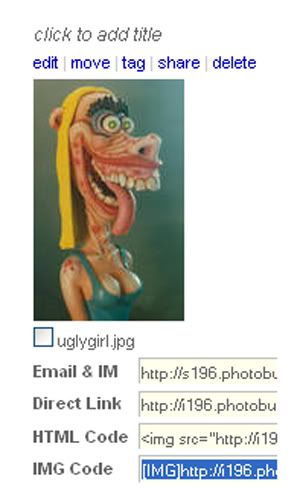
Copy that IMG code and paste it right into the message, with your cursor blinking right where you want the pic.
That does it. Like this:
Last edited by JBaker421; Aug 14, 2008 at 10:00 PM.
Thread Starter
|
Outstanding HDF Member
Joined: Oct 2006
Posts: 2,179
Likes: 1
From: Southern California