




How Do You Upload Large Pictures? HELP

Thread Starter
|
Road Captain


Joined: Dec 2007
Posts: 585
Likes: 59
From: Near St. Louis, Mo.
 How Do You Upload Large Pictures? HELP
Yes I have searched and I thought I was pretty good with computers. Yet I can't figure out how to upload the large pictures you guys attached to your posts. I have joined photobucket and uploaded my pics. When I try attaching the link it says it's an invalid file. I even tried resizing one and it still didn't work. Please someone make it simple enough this dummy can understand how to do it. Maybe I'm not getting the correct link from photobucket. Is it really that hard?
Seasoned HDF Member


Joined: Jan 2011
Posts: 28,845
Likes: 16,583
From: Wisconsin, USA

Join Photobucket. Upload your picture. When you click on your picture a dropdown menu appears, or you can double click the picture and off to side you will see this:
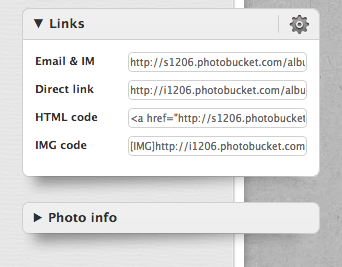
Single click the IMG code and paste that into your post.
I have Photobucket on my Droid and it is easy to upload from there. Or upload from your computer. Just make sure it is easy to find your picture.
Single click the IMG code and paste that into your post.
I have Photobucket on my Droid and it is easy to upload from there. Or upload from your computer. Just make sure it is easy to find your picture.

Ultimate HDF Member
Joined: May 2008
Posts: 6,508
Likes: 169
From: WPB, FL
Join Photobucket. Upload your picture. When you click on your picture a dropdown menu appears, or you can double click the picture and off to side you will see this:
Single click the IMG code and paste that into your post.
I have Photobucket on my Droid and it is easy to upload from there. Or upload from your computer. Just make sure it is easy to find your picture.
Single click the IMG code and paste that into your post.
I have Photobucket on my Droid and it is easy to upload from there. Or upload from your computer. Just make sure it is easy to find your picture.

right click the IMG code - copy and paste!

Road Captain
Joined: Dec 2012
Posts: 575
Likes: 0
From: Twin Cities
Join Photobucket. Upload your picture. When you click on your picture a dropdown menu appears, or you can double click the picture and off to side you will see this:
Single click the IMG code and paste that into your post.
I have Photobucket on my Droid and it is easy to upload from there. Or upload from your computer. Just make sure it is easy to find your picture.
Single click the IMG code and paste that into your post.
I have Photobucket on my Droid and it is easy to upload from there. Or upload from your computer. Just make sure it is easy to find your picture.
Thread Starter
|
Road Captain
Joined: Dec 2007
Posts: 585
Likes: 59
From: Near St. Louis, Mo.
I think I have done all that and it keeps telling me in valid file. Sorry don't usually struggle with this stuff.
Trending Topics
Thread Starter
|
Road Captain
Joined: Dec 2007
Posts: 585
Likes: 59
From: Near St. Louis, Mo.
I figured it out. I was just making it way to hard. Thanks
HD Forum Stories
The Best of Harley-Davidson for Lifelong Riders

Harley-Davidson Fat Boy Becomes a Dark, Decepticon-Inspired Custom
Verdad Gallardo
6 Weirdest Harley-Davidsons Ever Sold to the Public
Verdad Gallardo
7 Times Harley-Davidson Chucked Tradition Out the Window
Verdad Gallardo
7 Surprising Harley-Davidson Products that Are Not Motorcycles
Verdad Gallardo
8 Best Harley-Davidson Motorcycles Ever
Pouria Savadkouei
10 Worst Harley-Davidson Motorcycles Ever
Pouria Savadkouei
Killer Custom's Jail Break Is The Breakout That Refused to Blend In
Verdad Gallardo
Crazy Bunderbike Build Looks Amazing, But Is It Impossible to Ride?
Verdad Gallardo
Harley-Davidson Reveals Super Cool Cafe Racer Concept
Verdad Gallardo

First of all be sure to perform the steps below; If you have not done this then HDF will not allow you to post pictures:
1. go to your User CP (upper left side of page on blue toolbar) and left click it.
2. Scroll down to "Edit Options" and left click it.
3. Now scroll all the way down to the bottom to find the "Miscellaneous Options/Message Editor Interface" and
4. change the options box to "Enhanced Interface - Full WYSIWYG Editing".
5. Confirm settings by clicking "Save Changes" at the bottom of this page (see image below).

1. go to your User CP (upper left side of page on blue toolbar) and left click it.
2. Scroll down to "Edit Options" and left click it.
3. Now scroll all the way down to the bottom to find the "Miscellaneous Options/Message Editor Interface" and
4. change the options box to "Enhanced Interface - Full WYSIWYG Editing".
5. Confirm settings by clicking "Save Changes" at the bottom of this page (see image below).

Thread
Thread Starter
Forum
Replies
Last Post
