

Touring Models Road King, Road King Custom, Road King Classic, Road Glide, Street Glide, Electra Glide, Electra Glide Classic, and Electra Glide Ultra Classic bikes.
Sponsored by:
Sponsored by:

First Harley

Thread Tools
 
Search this Thread
 
Old Jan 30, 2021 | 04:20 PM
  #1  
Oldsoul79's Avatar
Oldsoul79
Thread Starter
|
2nd Gear
Joined: Jan 2021
Posts: 6
Likes: 4
From: Crossfied
Default First Harley

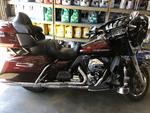
So I just bought my first Harley :-). It's a 2015 Road Glide . Now I can't wait for summer And riding season. I'm just learning about The Boombox 4.3 System I have And I would like to try and connect my phone wirelessly to it for music . When I go to the home screen The com Option is greyed out . Why is this? Do I need this to connect my phone wirelessly ? Thanks for the help

 
Reply
Old Jan 30, 2021 | 04:25 PM
  #2  
Screamin beagle's Avatar
Screamin beagle
Seasoned HDF Member
5 Year Member
Liked
Loved
Community Favorite
Joined: Jun 2017
Posts: 5,315
Likes: 4,272
From: Granville New York
Default

Can't help you with that but there's an audio sub forum that you'll probably have better luck in...and welcome to the forum
 
Reply
Old Jan 30, 2021 | 04:30 PM
  #3  
dakotared's Avatar
dakotared
Road Captain
Joined: Apr 2011
Posts: 610
Likes: 82
From: Indiana
Default

Congrats and welcome!
 
Reply
Old Jan 30, 2021 | 04:34 PM
  #4  
squirrelsnest's Avatar
squirrelsnest
Seasoned HDF Member
5 Year Member
Liked
Loved
Community Favorite
Joined: May 2016
Posts: 11,339
Likes: 5,939
From: Alexandria, Va
Default

Welcome to the forums from Virginia........
 
Reply
Old Jan 30, 2021 | 04:41 PM
  #5  
23Seven's Avatar
23Seven
Outstanding HDF Member
Joined: May 2012
Posts: 2,385
Likes: 1,442
From: Brentwood
Default

My first Harley’s only electronics was the speedo on the tank console.

Welcome to the forums... Nice choice for a 1st Harley
 
Reply
Old Jan 30, 2021 | 06:48 PM
  #6  
bdtaylor1979's Avatar
bdtaylor1979
Ultimate HDF Member
Joined: Feb 2009
Posts: 5,132
Likes: 228
From: Garland, TX
Default

Go to the settings and scroll until you see Bluetooth. Then choose add device and make sure the Bluetooth is on on your phone.
 
Reply
Old Jan 30, 2021 | 09:02 PM
  #7  
hamah's Avatar
hamah
Road Warrior
5 Year Member
Liked
Loved
Community Favorite
Joined: Feb 2016
Posts: 1,354
Likes: 399
From: Vancouver, BC
Default

Here is a link to the Boom! manual. As mentioned, first Bluetooth pair your phone. Go to Home>Setup>Bluetooth Setup (pg 89 in the manual). Then once your phone is paired go to Home>Media> and select your Bluetooth connected phone (see page 80 of the manual)
 
Reply
Old Jan 30, 2021 | 09:32 PM
  #8  
OLD 96's Avatar
OLD 96
Seasoned HDF Member
15 Year Member
Liked
Loved
Community Favorite
Joined: Jan 2009
Posts: 5,140
Likes: 2,963
From: WACO
Default

Oldsoul79. Congrats on your first HD. Maybe the Audio Systems sub forum could help you out. Good Luck. Ride Safe. God Bless.
 
Reply
Old Jan 31, 2021 | 07:24 AM
  #9  
RKZen's Avatar
RKZen
Seasoned HDF Member
10 Year Member
Liked
Loved
Community Favorite
Joined: Aug 2013
Posts: 6,057
Likes: 1,942
From: Somewhere on the Bourbon trail
Default

Congrats on the new ride, and welcome to the "family". Post some pics when you get a chance. We like pics here.
 
Reply
Old Jan 31, 2021 | 09:23 AM
  #10  
Oldsoul79's Avatar
Oldsoul79
Thread Starter
|
2nd Gear
Joined: Jan 2021
Posts: 6
Likes: 4
From: Crossfied
Default


Reply


All times are GMT -5. The time now is 11:54 PM.