








How is this possible?
Thread Starter
|
Club Member
Joined: Mar 2012
Posts: 887
Likes: 1
From: Spring, Texas
 How is this possible?
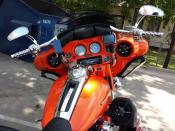
How is this possible? This guy has after market radio but on the top of the dash, there is the HK radio?? Does the HK radio have a removable face that lets you somehow stash the HK unit in the fairing and mount the face like it seems this guy did?
http://www.youtube.com/watch?v=lNIbUb0zbS4
http://www.youtube.com/watch?v=lNIbUb0zbS4
Thread Starter
|
Club Member
Joined: Mar 2012
Posts: 887
Likes: 1
From: Spring, Texas
I AGREE, music sucks!
But what I want to know is how and why the HK radio is sitting on the dash up there?
I am installing an after market radio but I also have the HD security system and CB. If there is a way to retain those and mount it up there like he did, I would like to find out how that is possible?
I don't use the CB or the intercom but if my key fob ever dies, you have to enter a code VIA the HK head unit or call a toy truck to the nearest dealer.
With an after market radio, I would be calling a tow truck unless I had what it looks like this guy has, a relocated HK radio face on the dash.
But what I want to know is how and why the HK radio is sitting on the dash up there?
I am installing an after market radio but I also have the HD security system and CB. If there is a way to retain those and mount it up there like he did, I would like to find out how that is possible?
I don't use the CB or the intercom but if my key fob ever dies, you have to enter a code VIA the HK head unit or call a toy truck to the nearest dealer.
With an after market radio, I would be calling a tow truck unless I had what it looks like this guy has, a relocated HK radio face on the dash.

Road Master
Joined: Jan 2010
Posts: 881
Likes: 13
From: ONT
I AGREE, music sucks!
But what I want to know is how and why the HK radio is sitting on the dash up there?
I am installing an after market radio but I also have the HD security system and CB. If there is a way to retain those and mount it up there like he did, I would like to find out how that is possible?
I don't use the CB or the intercom but if my key fob ever dies, you have to enter a code VIA the HK head unit or call a toy truck to the nearest dealer.
With an after market radio, I would be calling a tow truck unless I had what it looks like this guy has, a relocated HK radio face on the dash.
But what I want to know is how and why the HK radio is sitting on the dash up there?
I am installing an after market radio but I also have the HD security system and CB. If there is a way to retain those and mount it up there like he did, I would like to find out how that is possible?
I don't use the CB or the intercom but if my key fob ever dies, you have to enter a code VIA the HK head unit or call a toy truck to the nearest dealer.
With an after market radio, I would be calling a tow truck unless I had what it looks like this guy has, a relocated HK radio face on the dash.
Entering the PIN to Disarm HFSM (Example: 3-1-3-1-3)
NO. ACTION WAIT FOR CONFIRMATION NOTES
1 Set engine stop switch to OFF.
2 Turn ignition switch to IGNITION.
Security lamp blinks at fast rate and "0- - System is ready for PIN entry.
- - " is displayed in the odometer. The first
digit flashes.
Hold both turn switches in until confirmation.
*
3 Enter first digit of code (3) by pressing left
turn switch three times.
4 The first digit will be displayed and the next Serves as enter key.
dash will flash in the odometer.
5 Press right turn switch once.
Enter second digit of code (1) by pressing
left turn switch once.
6 The first two digits are displayed and the Serves as enter key.
next dash flashes in the odometer.
7 Press right turn switch once.
Enter third digit of code (3) by pressing
left turn switch three times.
8 The first three digits are displayed and the Serves as enter key.
next dash flashes in the odometer.
9 Press right turn switch once.
Enter fourth digit of code (1) by pressing
left turn switch 1 time.
10 The first four digits are displayed and the Serves as enter key.
next dash flashes in the odometer.
11 Press right turn switch once.
Enter fifth digit of code (3) by pressing left
turn switch three times.
12 Security lamp stops blinking and the odo- System is disarmed.
meter displays miles.
13 Press right turn switch once.
* This must be done within two seconds of turning the ignition switch to IGNITION. If system issues a warning before the security
system flashes at a fast rate, then cycle ignition switch OFF until security key icon flashes at 2.5 second rate before re-attempting
PIN entry.
HOME
3-8
When you rec'd the bike there should of been a security code already installed. If you don't know what it is you should read your owner's manual and find out what it is while your FOB is still working. (You need to have a functioning FOB near your bike to find out code.) It would also be a good idea to change the code to one you can remember as one day you may have to use it to start your bike.
Trending Topics
Thread Starter
|
Club Member
Joined: Mar 2012
Posts: 887
Likes: 1
From: Spring, Texas
Not really sure what your radio has to do with your security system. You use the left and right signal switches to input the numeric code which shows up in your odometer.
Entering the PIN to Disarm HFSM (Example: 3-1-3-1-3)
NO. ACTION WAIT FOR CONFIRMATION NOTES
1 Set engine stop switch to OFF.
2 Turn ignition switch to IGNITION.
Security lamp blinks at fast rate and "0- - System is ready for PIN entry.
- - " is displayed in the odometer. The first
digit flashes.
Hold both turn switches in until confirmation.
*
3 Enter first digit of code (3) by pressing left
turn switch three times.
4 The first digit will be displayed and the next Serves as enter key.
dash will flash in the odometer.
5 Press right turn switch once.
Enter second digit of code (1) by pressing
left turn switch once.
6 The first two digits are displayed and the Serves as enter key.
next dash flashes in the odometer.
7 Press right turn switch once.
Enter third digit of code (3) by pressing
left turn switch three times.
8 The first three digits are displayed and the Serves as enter key.
next dash flashes in the odometer.
9 Press right turn switch once.
Enter fourth digit of code (1) by pressing
left turn switch 1 time.
10 The first four digits are displayed and the Serves as enter key.
next dash flashes in the odometer.
11 Press right turn switch once.
Enter fifth digit of code (3) by pressing left
turn switch three times.
12 Security lamp stops blinking and the odo- System is disarmed.
meter displays miles.
13 Press right turn switch once.
* This must be done within two seconds of turning the ignition switch to IGNITION. If system issues a warning before the security
system flashes at a fast rate, then cycle ignition switch OFF until security key icon flashes at 2.5 second rate before re-attempting
PIN entry.
HOME
3-8
When you rec'd the bike there should of been a security code already installed. If you don't know what it is you should read your owner's manual and find out what it is while your FOB is still working. (You need to have a functioning FOB near your bike to find out code.) It would also be a good idea to change the code to one you can remember as one day you may have to use it to start your bike.
Entering the PIN to Disarm HFSM (Example: 3-1-3-1-3)
NO. ACTION WAIT FOR CONFIRMATION NOTES
1 Set engine stop switch to OFF.
2 Turn ignition switch to IGNITION.
Security lamp blinks at fast rate and "0- - System is ready for PIN entry.
- - " is displayed in the odometer. The first
digit flashes.
Hold both turn switches in until confirmation.
*
3 Enter first digit of code (3) by pressing left
turn switch three times.
4 The first digit will be displayed and the next Serves as enter key.
dash will flash in the odometer.
5 Press right turn switch once.
Enter second digit of code (1) by pressing
left turn switch once.
6 The first two digits are displayed and the Serves as enter key.
next dash flashes in the odometer.
7 Press right turn switch once.
Enter third digit of code (3) by pressing
left turn switch three times.
8 The first three digits are displayed and the Serves as enter key.
next dash flashes in the odometer.
9 Press right turn switch once.
Enter fourth digit of code (1) by pressing
left turn switch 1 time.
10 The first four digits are displayed and the Serves as enter key.
next dash flashes in the odometer.
11 Press right turn switch once.
Enter fifth digit of code (3) by pressing left
turn switch three times.
12 Security lamp stops blinking and the odo- System is disarmed.
meter displays miles.
13 Press right turn switch once.
* This must be done within two seconds of turning the ignition switch to IGNITION. If system issues a warning before the security
system flashes at a fast rate, then cycle ignition switch OFF until security key icon flashes at 2.5 second rate before re-attempting
PIN entry.
HOME
3-8
When you rec'd the bike there should of been a security code already installed. If you don't know what it is you should read your owner's manual and find out what it is while your FOB is still working. (You need to have a functioning FOB near your bike to find out code.) It would also be a good idea to change the code to one you can remember as one day you may have to use it to start your bike.
HD Forum Stories
The Best of Harley-Davidson for Lifelong Riders

7 Surprising Harley-Davidson Products that Are Not Motorcycles
Verdad Gallardo
8 Best Harley-Davidson Motorcycles Ever
Pouria Savadkouei
10 Worst Harley-Davidson Motorcycles Ever
Pouria Savadkouei
Killer Custom's Jail Break Is The Breakout That Refused to Blend In
Verdad Gallardo
Crazy Bunderbike Build Looks Amazing, But Is It Impossible to Ride?
Verdad Gallardo
Harley-Davidson Reveals Super Cool Cafe Racer Concept
Verdad Gallardo
Engraved Rebellion: Inside Bundnerbike's Glam Rock II
Verdad Gallardo
10 Motorcycles You Should Never Buy
Joe Kucinski
