





Tuning with "MyTune"

Thread Starter
|
Road Master
Joined: Apr 2008
Posts: 992
Likes: 1
From: Mechanicsburg, PA
 Tuning with "MyTune"
I have had a knock problem in my bike for quite some time and was looking for a way to get rid of it. Detonation is not good for your engine. After some looking I found this software called MyTune for $50. I was particularly interested in it as it was advertised to do knock removal. This software is marketed to people like me who have a SERT or SEST but nothing else.
I realized I had to buy interface cables so I ordered those from TTS Mastertune for $85. Later found out I could have bought them from HD cheaper (believe it or not) so here I am with the cable set and my SEST interface. I plug in and nothing. I had already paid for the MyTune software and figured it would become clear to me once I hooked everything up. It did not. Long story short you have to have the HD Super Tuner software to read and load maps. The guy at the dealer swore my SEST did not come with software, although some of the "older ones" did but whatever. $29.99 later and I have the CD. (Frank at MyTune gave me the part #'s for the cables and software). NOW it all makes sense.
So after some reading on the HD software help file I am off and running. I first loaded a basic map that was a starting point for my modifications which are a heavy breather and V&H BR 2-2 pipes. Next you put your SEST in record mode and go log data on a "closed course".
When logging data, it was recommended in the help file to make reference marks on the throttle grip for throttle positions to help make it easier to hold a steady throttle and also know where you are on the throttle.
Here is a pic of my reference marks

So you begin by opening up the front and rear cylinder VE tables by expanding them on the left and clicking on "working" and dragging to one of the four working windows on the right and select "display as table".
Here is a screenshot of my starting VE (volumetric efficiency) tables

then copy the tables by swiping from the upper left to lower right corner and paste into the MyTune software. One for the front cylinder and the other table for the rear cylinder. Here is a screenshot of the MyTune software with my starting VE tables.

after entering the table information you need to load your test logs you just got on your test drive by clicking "load logs and generate". Load the last logfile from your test drive and it will generate new VE values for you to copy and paste back into the HD software. Rename the map with the next successive number and reflash.
Here is a screenshot of my new VE's to copy into the HD software. Notice the changed areas are colored blue. They can be anywhere from blue to red and different shades to indicate how far off they are based on your logged data.
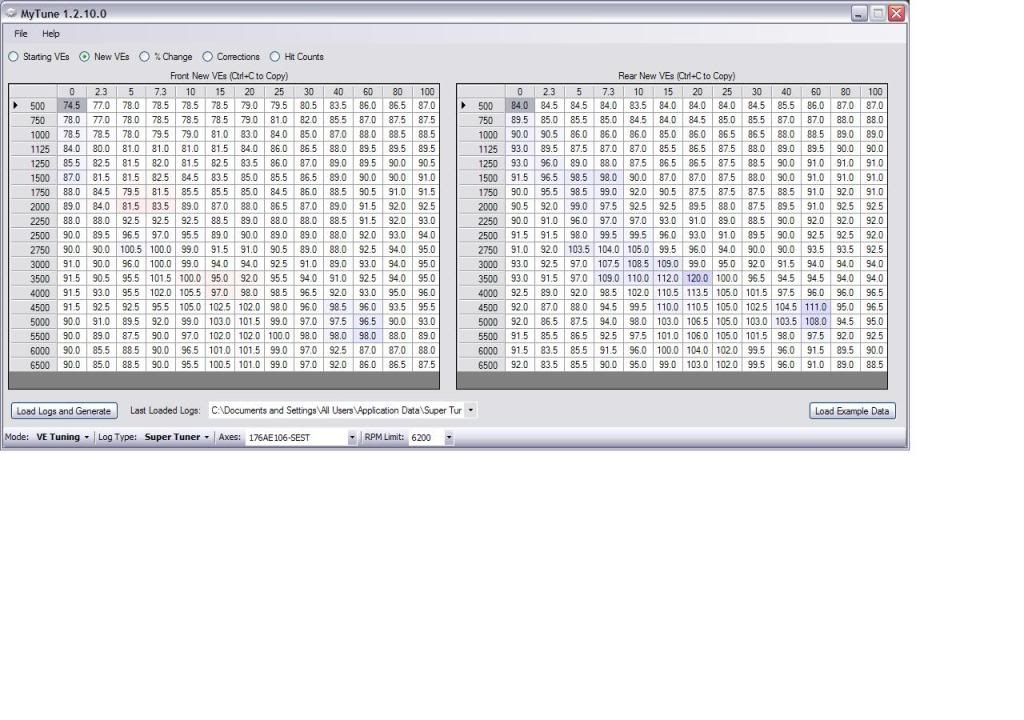
When you are prompted for your logfiles you can use more than one also. For example on my first run I used two logfiles to show the MyTune software. Just hold ctrl and select the files you want to use.

in the Mytune software you can view % of change, corrections, etc. This is nice to easily be able to see where and how much the values are changing. You do not copy and paste any of this, this is just for reference. You will look at this as you do successive runs and eventually you will be within 4% of changes to VE correction suggested. When you are this close you are finished. Here is a screenshot of the actual correction for VE on my first run.

Now, for the reason I bought this in the first place. Knock removal. For this you simply drag the spark advance tables into the windows to the right and use the same method I described above. Here is a screenshot of the spark advance table in the HD software after I have changed the values. Changed values appear in turquoise in the HD software btw.

Here is a screenshot of the timing corrections suggested by MyTune.

So it took about 7 or 8 runs, refining my tables more and more each run, to get my bike tuned. But now, after using this software, my volumetric efficiency table is within 4% of perfect and I have eliminated my knock!
No more detonation. My bike runs great. So after buying the cables, the MyTune software, and the HD software I have about $150 invested and I DON'T HAVE TO WORRY ABOUT THE KNOCK ANYMORE!
To anyone who has a SERT or SEST (and possibly other devices, check with MyTune) and wants to get rid of the detonation and tune your VE at the same time, I HIGHLY recommend this software.
MyTune's website is www.tunemyharley.com It's very basic but you'll get the point.
Brad
I realized I had to buy interface cables so I ordered those from TTS Mastertune for $85. Later found out I could have bought them from HD cheaper (believe it or not) so here I am with the cable set and my SEST interface. I plug in and nothing. I had already paid for the MyTune software and figured it would become clear to me once I hooked everything up. It did not. Long story short you have to have the HD Super Tuner software to read and load maps. The guy at the dealer swore my SEST did not come with software, although some of the "older ones" did but whatever. $29.99 later and I have the CD. (Frank at MyTune gave me the part #'s for the cables and software). NOW it all makes sense.
So after some reading on the HD software help file I am off and running. I first loaded a basic map that was a starting point for my modifications which are a heavy breather and V&H BR 2-2 pipes. Next you put your SEST in record mode and go log data on a "closed course".
When logging data, it was recommended in the help file to make reference marks on the throttle grip for throttle positions to help make it easier to hold a steady throttle and also know where you are on the throttle.
Here is a pic of my reference marks
So you begin by opening up the front and rear cylinder VE tables by expanding them on the left and clicking on "working" and dragging to one of the four working windows on the right and select "display as table".
Here is a screenshot of my starting VE (volumetric efficiency) tables
then copy the tables by swiping from the upper left to lower right corner and paste into the MyTune software. One for the front cylinder and the other table for the rear cylinder. Here is a screenshot of the MyTune software with my starting VE tables.
after entering the table information you need to load your test logs you just got on your test drive by clicking "load logs and generate". Load the last logfile from your test drive and it will generate new VE values for you to copy and paste back into the HD software. Rename the map with the next successive number and reflash.
Here is a screenshot of my new VE's to copy into the HD software. Notice the changed areas are colored blue. They can be anywhere from blue to red and different shades to indicate how far off they are based on your logged data.
When you are prompted for your logfiles you can use more than one also. For example on my first run I used two logfiles to show the MyTune software. Just hold ctrl and select the files you want to use.
in the Mytune software you can view % of change, corrections, etc. This is nice to easily be able to see where and how much the values are changing. You do not copy and paste any of this, this is just for reference. You will look at this as you do successive runs and eventually you will be within 4% of changes to VE correction suggested. When you are this close you are finished. Here is a screenshot of the actual correction for VE on my first run.
Now, for the reason I bought this in the first place. Knock removal. For this you simply drag the spark advance tables into the windows to the right and use the same method I described above. Here is a screenshot of the spark advance table in the HD software after I have changed the values. Changed values appear in turquoise in the HD software btw.
Here is a screenshot of the timing corrections suggested by MyTune.
So it took about 7 or 8 runs, refining my tables more and more each run, to get my bike tuned. But now, after using this software, my volumetric efficiency table is within 4% of perfect and I have eliminated my knock!
No more detonation. My bike runs great. So after buying the cables, the MyTune software, and the HD software I have about $150 invested and I DON'T HAVE TO WORRY ABOUT THE KNOCK ANYMORE!
To anyone who has a SERT or SEST (and possibly other devices, check with MyTune) and wants to get rid of the detonation and tune your VE at the same time, I HIGHLY recommend this software.
MyTune's website is www.tunemyharley.com It's very basic but you'll get the point.
Brad

Road Warrior
Joined: Apr 2010
Posts: 1,739
Likes: 10
From: Suffolk, England
That's really interesting stuff. Thanks for posting.
When I started messing with the SEPST I was surprised that the Smart Tune feature only seems to cover AFR and not timing too. Though there is quite a bit going on behind the smoke and mirrors with the EFI these days and its hard to say its not being changed and its just not obvious its happening. So its interesting to see there is some software available to auto-tune the knock out this way.
Personally though I think I might have tried richening things first before changing the timing; knock being a product of fuel and/or timing. Once I had richened things a little with the CLB table (say from stock of ~500 to ~700) I would then have taken a bit of timing out if it still needed it. Reason for this is that its usually a bit of both needed to eliminate knock and by just doing the timing you risk robbing your bike of some top-end power unnecessarily.
When I started messing with the SEPST I was surprised that the Smart Tune feature only seems to cover AFR and not timing too. Though there is quite a bit going on behind the smoke and mirrors with the EFI these days and its hard to say its not being changed and its just not obvious its happening. So its interesting to see there is some software available to auto-tune the knock out this way.
Personally though I think I might have tried richening things first before changing the timing; knock being a product of fuel and/or timing. Once I had richened things a little with the CLB table (say from stock of ~500 to ~700) I would then have taken a bit of timing out if it still needed it. Reason for this is that its usually a bit of both needed to eliminate knock and by just doing the timing you risk robbing your bike of some top-end power unnecessarily.
Thread Starter
|
Road Master
Joined: Apr 2008
Posts: 992
Likes: 1
From: Mechanicsburg, PA

Personally though I think I might have tried richening things first before changing the timing; knock being a product of fuel and/or timing. Once I had richened things a little with the CLB table (say from stock of ~500 to ~700) I would then have taken a bit of timing out if it still needed it. Reason for this is that its usually a bit of both needed to eliminate knock and by just doing the timing you risk robbing your bike of some top-end power unnecessarily.
On the knock issue, many many forum members have a knock they cannot get rid of. I was one of those people. This is the main reason I wanted this software in the first place. So, if my mixture is perfect (4% adjustment or less) and my engine is still knocking I am gonna do what I have to do to get rid of that. Timing is what does it. It took several runs, basically all day long logging data and adjusting tables, each time it backed off my timing a little here and a little there. Finally the knock is gone. The bike runs smooth at all loads and RPM.
If you have a SERT or SEST and you have a knock, get this!
Road Warrior
Joined: Apr 2010
Posts: 1,739
Likes: 10
From: Suffolk, England
right on. But what is cool is setting the VE tables does just that. It measures how efficiently it can move a volume of air thru the cylinder compared to the theoretical amount of air...at different rpm and different loads. In the end the bike should have a near perfect stoichiometric mixture.
This is the main reason I wanted this software in the first place. So, if my mixture is perfect (4% adjustment or less) and my engine is still knocking I am gonna do what I have to do to get rid of that. Timing is what does it.
This is the main reason I wanted this software in the first place. So, if my mixture is perfect (4% adjustment or less) and my engine is still knocking I am gonna do what I have to do to get rid of that. Timing is what does it.
Adjusting the VE tables only gets your AFR close to 14.6:1, assuming ~500 in the CLB table. All these bikes bikes run better with the bias set to make it a little richer. This reduces temp, improves performance and reduces knock without making a significant change to mileage.
I'm real glad you got rid of that knock but you may have done it by taking out more timing than you really needed compared to if you had just richened the mix a little before doing the runs with My Tune.
Elite HDF Member
Joined: Apr 2007
Posts: 4,919
Likes: 23
From: Seattle, WA
Nice write-up Lorance ... definitely needed to address that detonation issue so as to prevent serious long-term damage to your motor ....
I see Fox's point though on possibly enrichening the mixture a little ... although volumetric efficiency in and of itself has nothing to do with AFR, per se. I would assume you are not using the stock 14.6 ratio but something lower than that ...? If so--and you were still experiencing detonation--then, it would make sense to retard the ignition as needed ....
While a two pronged approach could be utilized to combat the problem, if you are already running a nicely enriched AFR, then it appears your methods were sound ....
R/
'Chop
I see Fox's point though on possibly enrichening the mixture a little ... although volumetric efficiency in and of itself has nothing to do with AFR, per se. I would assume you are not using the stock 14.6 ratio but something lower than that ...? If so--and you were still experiencing detonation--then, it would make sense to retard the ignition as needed ....
While a two pronged approach could be utilized to combat the problem, if you are already running a nicely enriched AFR, then it appears your methods were sound ....
R/
'Chop
Trending Topics
Thread Starter
|
Road Master
Joined: Apr 2008
Posts: 992
Likes: 1
From: Mechanicsburg, PA
Nice write-up Lorance ... definitely needed to address that detonation issue so as to prevent serious long-term damage to your motor ....
I see Fox's point though on possibly enrichening the mixture a little ... although volumetric efficiency in and of itself has nothing to do with AFR, per se. I would assume you are not using the stock 14.6 ratio but something lower than that ...? If so--and you were still experiencing detonation--then, it would make sense to retard the ignition as needed ....
While a two pronged approach could be utilized to combat the problem, if you are already running a nicely enriched AFR, then it appears your methods were sound ....
R/
'Chop
I see Fox's point though on possibly enrichening the mixture a little ... although volumetric efficiency in and of itself has nothing to do with AFR, per se. I would assume you are not using the stock 14.6 ratio but something lower than that ...? If so--and you were still experiencing detonation--then, it would make sense to retard the ignition as needed ....
While a two pronged approach could be utilized to combat the problem, if you are already running a nicely enriched AFR, then it appears your methods were sound ....
R/
'Chop
I can say in the end my bike runs strong as ever. I am in no way dissatisfied with the power and it eliminated my knock. I suppose if I wanted to squeeze out every horse I could get it would be beneficial to dyno it and maybe play around with the AFR but for my needs this fits the bill. What a relief it is to not hear any ping anymore. I can roll on the throttle hard now without worrying about my pistons and valves getting damaged.
For me, it was just awesome. I usually do not bother doing pics and screenshots but I was really excited to post this for anyone else to read as the knock seems to be a recurring topic on the forums.
Brad
HD Forum Stories
The Best of Harley-Davidson for Lifelong Riders

7 Surprising Harley-Davidson Products that Are Not Motorcycles
Verdad Gallardo
8 Best Harley-Davidson Motorcycles Ever
Pouria Savadkouei
10 Worst Harley-Davidson Motorcycles Ever
Pouria Savadkouei
Killer Custom's Jail Break Is The Breakout That Refused to Blend In
Verdad Gallardo
Crazy Bunderbike Build Looks Amazing, But Is It Impossible to Ride?
Verdad Gallardo
Harley-Davidson Reveals Super Cool Cafe Racer Concept
Verdad Gallardo
Engraved Rebellion: Inside Bundnerbike's Glam Rock II
Verdad Gallardo
10 Motorcycles You Should Never Buy
Joe Kucinski
10 Things Harley-Davidson Needs to Fix in 2026
Verdad Gallardo
Road Master


Joined: Aug 2008
Posts: 1,027
Likes: 163
From: Grapevine Texas
Lorance, that's pretty dang cool man, that looks very similiar to a couple of the tables and procedures I'm using with my new TTS system. In fact I was looking at your VE tables and I think I'm doing things right because your ratios are pretty close in a lot of areas as my ve's, so guess I'm on the right track,lol....
Nice work bud...
Nice work bud...
I have had a knock problem in my bike for quite some time and was looking for a way to get rid of it. Detonation is not good for your engine. After some looking I found this software called MyTune for $50. I was particularly interested in it as it was advertised to do knock removal. This software is marketed to people like me who have a SERT or SEST but nothing else.
I realized I had to buy interface cables so I ordered those from TTS Mastertune for $85. Later found out I could have bought them from HD cheaper (believe it or not) so here I am with the cable set and my SEST interface. I plug in and nothing. I had already paid for the MyTune software and figured it would become clear to me once I hooked everything up. It did not. Long story short you have to have the HD Super Tuner software to read and load maps. The guy at the dealer swore my SEST did not come with software, although some of the "older ones" did but whatever. $29.99 later and I have the CD. (Frank at MyTune gave me the part #'s for the cables and software). NOW it all makes sense.
So after some reading on the HD software help file I am off and running. I first loaded a basic map that was a starting point for my modifications which are a heavy breather and V&H BR 2-2 pipes. Next you put your SEST in record mode and go log data on a "closed course".
When logging data, it was recommended in the help file to make reference marks on the throttle grip for throttle positions to help make it easier to hold a steady throttle and also know where you are on the throttle.
Here is a pic of my reference marks
So you begin by opening up the front and rear cylinder VE tables by expanding them on the left and clicking on "working" and dragging to one of the four working windows on the right and select "display as table".
Here is a screenshot of my starting VE (volumetric efficiency) tables
then copy the tables by swiping from the upper left to lower right corner and paste into the MyTune software. One for the front cylinder and the other table for the rear cylinder. Here is a screenshot of the MyTune software with my starting VE tables.
after entering the table information you need to load your test logs you just got on your test drive by clicking "load logs and generate". Load the last logfile from your test drive and it will generate new VE values for you to copy and paste back into the HD software. Rename the map with the next successive number and reflash.
Here is a screenshot of my new VE's to copy into the HD software. Notice the changed areas are colored blue. They can be anywhere from blue to red and different shades to indicate how far off they are based on your logged data.
When you are prompted for your logfiles you can use more than one also. For example on my first run I used two logfiles to show the MyTune software. Just hold ctrl and select the files you want to use.
in the Mytune software you can view % of change, corrections, etc. This is nice to easily be able to see where and how much the values are changing. You do not copy and paste any of this, this is just for reference. You will look at this as you do successive runs and eventually you will be within 4% of changes to VE correction suggested. When you are this close you are finished. Here is a screenshot of the actual correction for VE on my first run.
Now, for the reason I bought this in the first place. Knock removal. For this you simply drag the spark advance tables into the windows to the right and use the same method I described above. Here is a screenshot of the spark advance table in the HD software after I have changed the values. Changed values appear in turquoise in the HD software btw.
Here is a screenshot of the timing corrections suggested by MyTune.
So it took about 7 or 8 runs, refining my tables more and more each run, to get my bike tuned. But now, after using this software, my volumetric efficiency table is within 4% of perfect and I have eliminated my knock!
No more detonation. My bike runs great. So after buying the cables, the MyTune software, and the HD software I have about $150 invested and I DON'T HAVE TO WORRY ABOUT THE KNOCK ANYMORE!
To anyone who has a SERT or SEST (and possibly other devices, check with MyTune) and wants to get rid of the detonation and tune your VE at the same time, I HIGHLY recommend this software.
MyTune's website is www.tunemyharley.com It's very basic but you'll get the point.
Brad
I realized I had to buy interface cables so I ordered those from TTS Mastertune for $85. Later found out I could have bought them from HD cheaper (believe it or not) so here I am with the cable set and my SEST interface. I plug in and nothing. I had already paid for the MyTune software and figured it would become clear to me once I hooked everything up. It did not. Long story short you have to have the HD Super Tuner software to read and load maps. The guy at the dealer swore my SEST did not come with software, although some of the "older ones" did but whatever. $29.99 later and I have the CD. (Frank at MyTune gave me the part #'s for the cables and software). NOW it all makes sense.
So after some reading on the HD software help file I am off and running. I first loaded a basic map that was a starting point for my modifications which are a heavy breather and V&H BR 2-2 pipes. Next you put your SEST in record mode and go log data on a "closed course".
When logging data, it was recommended in the help file to make reference marks on the throttle grip for throttle positions to help make it easier to hold a steady throttle and also know where you are on the throttle.
Here is a pic of my reference marks
So you begin by opening up the front and rear cylinder VE tables by expanding them on the left and clicking on "working" and dragging to one of the four working windows on the right and select "display as table".
Here is a screenshot of my starting VE (volumetric efficiency) tables
then copy the tables by swiping from the upper left to lower right corner and paste into the MyTune software. One for the front cylinder and the other table for the rear cylinder. Here is a screenshot of the MyTune software with my starting VE tables.
after entering the table information you need to load your test logs you just got on your test drive by clicking "load logs and generate". Load the last logfile from your test drive and it will generate new VE values for you to copy and paste back into the HD software. Rename the map with the next successive number and reflash.
Here is a screenshot of my new VE's to copy into the HD software. Notice the changed areas are colored blue. They can be anywhere from blue to red and different shades to indicate how far off they are based on your logged data.
When you are prompted for your logfiles you can use more than one also. For example on my first run I used two logfiles to show the MyTune software. Just hold ctrl and select the files you want to use.
in the Mytune software you can view % of change, corrections, etc. This is nice to easily be able to see where and how much the values are changing. You do not copy and paste any of this, this is just for reference. You will look at this as you do successive runs and eventually you will be within 4% of changes to VE correction suggested. When you are this close you are finished. Here is a screenshot of the actual correction for VE on my first run.
Now, for the reason I bought this in the first place. Knock removal. For this you simply drag the spark advance tables into the windows to the right and use the same method I described above. Here is a screenshot of the spark advance table in the HD software after I have changed the values. Changed values appear in turquoise in the HD software btw.
Here is a screenshot of the timing corrections suggested by MyTune.
So it took about 7 or 8 runs, refining my tables more and more each run, to get my bike tuned. But now, after using this software, my volumetric efficiency table is within 4% of perfect and I have eliminated my knock!
No more detonation. My bike runs great. So after buying the cables, the MyTune software, and the HD software I have about $150 invested and I DON'T HAVE TO WORRY ABOUT THE KNOCK ANYMORE!
To anyone who has a SERT or SEST (and possibly other devices, check with MyTune) and wants to get rid of the detonation and tune your VE at the same time, I HIGHLY recommend this software.
MyTune's website is www.tunemyharley.com It's very basic but you'll get the point.
Brad
Thread Starter
|
Road Master
Joined: Apr 2008
Posts: 992
Likes: 1
From: Mechanicsburg, PA
Lorance, that's pretty dang cool man, that looks very similiar to a couple of the tables and procedures I'm using with my new TTS system. In fact I was looking at your VE tables and I think I'm doing things right because your ratios are pretty close in a lot of areas as my ve's, so guess I'm on the right track,lol....
Nice work bud...
Nice work bud...
Do you have about the same setup on your engine as I do? (VH BR 2-2 and SE Heavy Breather on mine) (No other performance mods)