




Timing Chart Needed
Thread Starter
|
Advanced
Joined: Jul 2010
Posts: 51
Likes: 0
From: Maryland
 Timing Chart Needed
I have a 2010 FXDWG with a SE 204 Cam, Big Shots and SE Heavy Breather. The basemap that comes out of the ThunderMax library is for a 575 cam with longer duration and different timing. Does anyone know where I can get a timing vs. engine speed or timing vs TPS chart? My only other option is a dyno tune and I bought the ThunderMax so I didn't have to get dyno tunes!
The other map that Zippers suggested was for a stock set up, and that took away so much power that I would rather attempt to retard the timing on the 575 map. I just don't know how much it needs.
The other map that Zippers suggested was for a stock set up, and that took away so much power that I would rather attempt to retard the timing on the 575 map. I just don't know how much it needs.
Seasoned HDF Member


Joined: Jul 2008
Posts: 9,282
Likes: 1,139
From: southeast PA
Exactly what is the bike doing?
What does it say in the TMax Control Center about your state of tune with the 575 cam? The map with the stock cam isn't going to help, go back to the other map. Was it #697? Make sure when you load the new map you don't miss any of the steps. I think after about 300 miles there should be some learning and then maybe send the map to Zippers and have their techs take a look at it.
Thread Starter
|
Advanced
Joined: Jul 2010
Posts: 51
Likes: 0
From: Maryland
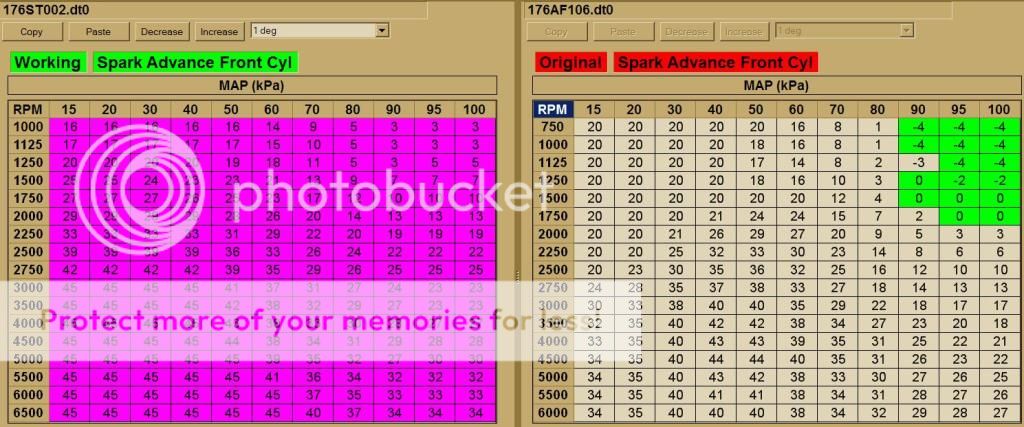
Thanks Foxster. Does the top axis translate into throttle(%) position? I have a chart in the Thundermax for Ignition Timing vs Engine Speed, and then maps/tables for Ignition Timing vs Throttle Position for every 250rpms. What you sent looks like Timing vs Throttle Position? I used the 699 map that is for 575 cams. The stock map needed way to much adjustment. Atleast with the 575cam map I only needed to dial back the timing and could use the Thundermax autotune to configure the AFR.
Thundermax doesnt have a nock sensor so it wont adjust timing. That is one of the only things it wont do!
Thundermax doesnt have a nock sensor so it wont adjust timing. That is one of the only things it wont do!

Road Warrior
Joined: Apr 2010
Posts: 1,739
Likes: 10
From: Suffolk, England
The top line is MAP, which is the Manifold Air Pressure, read from the bike's sensor inside the intake manifold. It indicates the load on the engine rather than throttle position. Its generally a good way of setting the timing because you know whether the bike's accelerating, decelerating or steady at a particular RPM/throttle position. It also adjusts for altitude.
Reading left to right generally indicates steady throttle positions. 100kPa being air pressure at sea level and so meaning the throttle is wide open.
Does your Thundermax not read the MAP sensor? If not then I guess you can use this table and take 15kPa as closed throttle and 100kPa as WOT and just translate that to throttle positions between 0 and 100% in increments of 10%.
You'll have to do a little extrapolation to get your 250 RPM increments.
Nice way to view this is to use an spreadsheet and a 3D chart to show the data with throttle position/MAP on one axis, RPM on another and advance as the variable data on the third, like this:

You can then get a feel for the data and do some smoothing to take out any bumps where you would get some sudden timing changes.
Reading left to right generally indicates steady throttle positions. 100kPa being air pressure at sea level and so meaning the throttle is wide open.
Does your Thundermax not read the MAP sensor? If not then I guess you can use this table and take 15kPa as closed throttle and 100kPa as WOT and just translate that to throttle positions between 0 and 100% in increments of 10%.
You'll have to do a little extrapolation to get your 250 RPM increments.
Nice way to view this is to use an spreadsheet and a 3D chart to show the data with throttle position/MAP on one axis, RPM on another and advance as the variable data on the third, like this:
You can then get a feel for the data and do some smoothing to take out any bumps where you would get some sudden timing changes.
Club Member
Joined: Feb 2008
Posts: 11,483
Likes: 39
From: Passaic County, NJ
Oooh, I didn't know that. Good info to know.
Trending Topics
Road Warrior
Joined: Apr 2010
Posts: 1,739
Likes: 10
From: Suffolk, England
Just for fun, here's the timing map for the SEPST stage-1 + SE204 in graphical form. You can see there is a little smoothing that could be done...

HD Forum Stories
The Best of Harley-Davidson for Lifelong Riders

Jason Momoa Is Turning Classic Harleys Into PHEVs
Verdad Gallardo
Harley-Davidson Fat Boy Becomes a Dark, Decepticon-Inspired Custom
Verdad Gallardo
6 Weirdest Harley-Davidsons Ever Sold to the Public
Verdad Gallardo
7 Times Harley-Davidson Chucked Tradition Out the Window
Verdad Gallardo
7 Surprising Harley-Davidson Products that Are Not Motorcycles
Verdad Gallardo
8 Best Harley-Davidson Motorcycles Ever
Pouria Savadkouei
10 Worst Harley-Davidson Motorcycles Ever
Pouria Savadkouei
Killer Custom's Jail Break Is The Breakout That Refused to Blend In
Verdad Gallardo
Crazy Bunderbike Build Looks Amazing, But Is It Impossible to Ride?
Verdad Gallardo
Thread Starter
|
Advanced
Joined: Jul 2010
Posts: 51
Likes: 0
From: Maryland
The timing you sent is even more advanced than the 575 cam basemap! I had to retard the timing for the 204 cams to eliminate the pining. It looks like this will bring back the pining and make it worse?