





Signature Pic won't Show

Thread Starter
|
Intermediate
Joined: Mar 2011
Posts: 31
Likes: 0
 Signature Pic won't Show
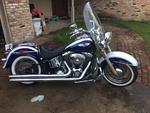
Ok, you geniuses: I have put the photo of my lovely bike in my signature, but try as I might, it won't show up on my signature. If I'm right, this one will show my bike only as my Avatar, and there will be a description of my bike in the signature, but not a photo in the signature (larger, better).
It says it's my current signature photo. What am I missing?
It says it's my current signature photo. What am I missing?
Are you using the correct pic statement....Here is mine (with the spaces so you can see how it's spelled)
[ SIGPIC ] http://www.mym109r.com/gallery/data/...lide-Ultra.jpg [ / SIGPIC ]
[ SIGPIC ] http://www.mym109r.com/gallery/data/...lide-Ultra.jpg [ / SIGPIC ]
Thread Starter
|
Intermediate
Joined: Mar 2011
Posts: 31
Likes: 0
Are you using the correct pic statement....Here is mine (with the spaces so you can see how it's spelled)
[ SIGPIC ] http://www.mym109r.com/gallery/data/...lide-Ultra.jpg [ / SIGPIC ]
[ SIGPIC ] http://www.mym109r.com/gallery/data/...lide-Ultra.jpg [ / SIGPIC ]
However, it specifies width at 500, height at 250, and max file size at about 94 something or other.
My file size was only 70, but my height was 300. So I shortened the dimensions, and saved it again. If it's showing on this post, then I got it fixed. If it doesn't show on this post, then I still haven't figured it out.
Trending Topics

Ultimate HDF Member
Joined: Sep 2005
Posts: 5,119
Likes: 2
From: USA
Go to your user CP, click on edit signature pic, load the
URL, Follow the arrows # 1 thru # 4

URL, Follow the arrows # 1 thru # 4
Last edited by Snarly; Sep 6, 2011 at 02:11 PM.
HD Forum Stories
The Best of Harley-Davidson for Lifelong Riders

7 Surprising Harley-Davidson Products that Are Not Motorcycles
Verdad Gallardo
8 Best Harley-Davidson Motorcycles Ever
Pouria Savadkouei
10 Worst Harley-Davidson Motorcycles Ever
Pouria Savadkouei
Killer Custom's Jail Break Is The Breakout That Refused to Blend In
Verdad Gallardo
Crazy Bunderbike Build Looks Amazing, But Is It Impossible to Ride?
Verdad Gallardo
Harley-Davidson Reveals Super Cool Cafe Racer Concept
Verdad Gallardo
Engraved Rebellion: Inside Bundnerbike's Glam Rock II
Verdad Gallardo
10 Motorcycles You Should Never Buy
Joe Kucinski
10 Things Harley-Davidson Needs to Fix in 2026
Verdad Gallardo
Seasoned HDF Member
Joined: Mar 2007
Posts: 66,948
Likes: 4,573
From: TOAK western branch
Doesnt matter how many times I try I dont get the "insert picture" option. Ideas?


Elite HDF Member
Joined: Jul 2007
Posts: 3,891
Likes: 54
From: Mansfield, MA
From the Sticky thread.
Make Sure you have gone to your "USER CP" (blue bar,left side at the top of the forum) and then click on "Edit Options" and scroll all the way to the bottom and use the drop down to change from "Basic Editor" to "Standard Editor." This will allow you to "Insert" your photo into your Sig.
While you are in "Edit Options" you can change your time and change the Forum Defaults so you can see more threads and posts. You can also click on the box to allow the PM system to notify you when you have a new pm (pop up).
While you are in "Edit Options" you can change your time and change the Forum Defaults so you can see more threads and posts. You can also click on the box to allow the PM system to notify you when you have a new pm (pop up).