



OddBall Dyno Sheet
Thread Starter
|
Intermediate
Joined: Sep 2011
Posts: 47
Likes: 0
From: Cocoa Beach, FL

Unless the OP has changed lifters, he is running the OEM "B" lifter; the best the MoCo has made. There have not been many reported issues with the B lifters, even in performance applications; however, that does not mean that they can't go bad. Of course the OP should inspect the lifters as dynawg1 suggests but I would not worry about scuffing on the outer surfaces; "grooves" yes but not scuffing that could be polished out. There is no way that I know of to check a lifter that bleeds down at higher rpms as in the case of 98hotrodfatboy. One would just have to guess which lifter is losing its prime at higher rpms and replace it.
The OP has referred to a "ticking" sound that turns into a "high pitched squealing or whirring sound". That indicates to me that the sounds are two different sounds with two different sources. The ticking is most likely valve train noise that can be reduced or eliminated with more preload on the lifters. The squealing/whirring sound is most likely coming from something rotating in the cam chest or even the primary but the OP seems to be focused on the cam chest. So, he should be looking at all rotating components in the cam chest for the source of that noise.
I hope the OP posts some pictures of the cam chest and components as he tears into it. I am also interested in his compression numbers.
The OP has referred to a "ticking" sound that turns into a "high pitched squealing or whirring sound". That indicates to me that the sounds are two different sounds with two different sources. The ticking is most likely valve train noise that can be reduced or eliminated with more preload on the lifters. The squealing/whirring sound is most likely coming from something rotating in the cam chest or even the primary but the OP seems to be focused on the cam chest. So, he should be looking at all rotating components in the cam chest for the source of that noise.
I hope the OP posts some pictures of the cam chest and components as he tears into it. I am also interested in his compression numbers.
Last edited by BamBamUSMC; Apr 24, 2015 at 03:57 PM.

HDF Community Team


Joined: Jun 2006
Posts: 12,779
Likes: 2,608
From: san antonio

Well guys, I think I can now put my finger on it, and I was more than a little p****d off about it too. I decided to tear into it the night before I deploy. Pulled the exhaust, push rods, and finally the can chest. As soon as I had the cam cover off I could see something wrong. The lower, outer cam gear was sticking out a lot further than the larger top gear. When I measured it with the feeler it was .021. The max allowable is .010 per the book. When I pulled the outer gears off, there was no thrust washer behind the large outer gear. The builder put it back together with now washer. With the large gear torqued down to the cam plate with no washer, I'm betting it would slow things down. I'm also guessing that it was the cause of the squeeling sound. So, my bike sits broken down while I'm gone cuz I couldn't get a thrust washer tonight. Looks like I need at about .020. What do you think, could that have caused the problems I've been having?
Lifters look good btw.
Lifters look good btw.
1. You need to pull the cam plate/cams out, remove cams from the cam plate and start over; first check the inner cam gears to be sure that they have been properly and fully pressed on the cam shafts.
2. Reinstall the cams in the cam plate and check the inner gear lash; check the attachments for one way to do that; lash should be .0005"-.001"; too tight and they will whine; too loose and the rattle.
3. Install the outer gears, no thrust washer behind the rear cam gear as with sprockets.
4. With 585 lift cams you should also check the clearance between the case main bearing boss and cam lobes; should be at least .030". Shouldn't be an issue in an '07 model but worth checking while you are in there. You can wrap electrical tape around the rear cam lobes to add .030" to the cam lobe and rotate the cams with the cam plate attached; if no contact, no worries.
5. Check the inside of the cam chest cover for possible contact with the rear cam gear
6. The outer cam gear teeth should be fully engaged with no overlap. You can adjust the front cam gear in/out by changing the spacer behind the cam gear.
7. Check the outer gear lash; see the attachment for one way to do this. I use plastigage as well but there is something about seeing the lash on a dial that is reassuring.
There are undersize/over size inner gears and undersize/oversize pinion gears available if necessary to correct lash.
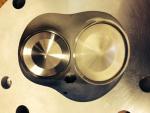
EDIT: I have also attached a photo to illustrate the area at the main bearing boss that might need clearing (doubt it) but worth checking. See the machined areas at the top of the main bearing boss.
Last edited by djl; Apr 23, 2015 at 10:06 AM.
Tourer

Joined: Sep 2014
Posts: 420
Likes: 5
From: Kingsport, TN
Also, check the clearance between the outermost left-side teeth of the large cam gear and the adjacent boss inside the cam cover. I had relieve quite a bit of material from that boss to get .030" clearance between it and the large-gear teeth.
Thread Starter
|
Intermediate
Joined: Sep 2011
Posts: 47
Likes: 0
From: Cocoa Beach, FL
Sounds like you are sneaking up on the problem and none too soon; a couple of things to check.
1. You need to pull the cam plate/cams out, remove cams from the cam plate and start over; first check the inner cam gears to be sure that they have been properly and fully pressed on the cam shafts.
2. Reinstall the cams in the cam plate and check the inner gear lash; check the attachments for one way to do that; lash should be .0005"-.001"; too tight and they will whine; too loose and the rattle.
3. Install the outer gears, no thrust washer behind the rear cam gear as with sprockets.
4. With 585 lift cams you should also check the clearance between the case main bearing boss and cam lobes; should be at least .030". Shouldn't be an issue in an '07 model but worth checking while you are in there. You can wrap electrical tape around the rear cam lobes to add .030" to the cam lobe and rotate the cams with the cam plate attached; if no contact, no worries.
5. Check the inside of the cam chest cover for possible contact with the rear cam gear
6. The outer cam gear teeth should be fully engaged with no overlap. You can adjust the front cam gear in/out by changing the spacer behind the cam gear.
7. Check the outer gear lash; see the attachment for one way to do this. I use plastigage as well but there is something about seeing the lash on a dial that is reassuring.
There are undersize/over size inner gears and undersize/oversize pinion gears available if necessary to correct lash.
EDIT: I have also attached a photo to illustrate the area at the main bearing boss that might need clearing (doubt it) but worth checking. See the machined areas at the top of the main bearing boss.
1. You need to pull the cam plate/cams out, remove cams from the cam plate and start over; first check the inner cam gears to be sure that they have been properly and fully pressed on the cam shafts.
2. Reinstall the cams in the cam plate and check the inner gear lash; check the attachments for one way to do that; lash should be .0005"-.001"; too tight and they will whine; too loose and the rattle.
3. Install the outer gears, no thrust washer behind the rear cam gear as with sprockets.
4. With 585 lift cams you should also check the clearance between the case main bearing boss and cam lobes; should be at least .030". Shouldn't be an issue in an '07 model but worth checking while you are in there. You can wrap electrical tape around the rear cam lobes to add .030" to the cam lobe and rotate the cams with the cam plate attached; if no contact, no worries.
5. Check the inside of the cam chest cover for possible contact with the rear cam gear
6. The outer cam gear teeth should be fully engaged with no overlap. You can adjust the front cam gear in/out by changing the spacer behind the cam gear.
7. Check the outer gear lash; see the attachment for one way to do this. I use plastigage as well but there is something about seeing the lash on a dial that is reassuring.
There are undersize/over size inner gears and undersize/oversize pinion gears available if necessary to correct lash.
EDIT: I have also attached a photo to illustrate the area at the main bearing boss that might need clearing (doubt it) but worth checking. See the machined areas at the top of the main bearing boss.
Thread Starter
|
Intermediate
Joined: Sep 2011
Posts: 47
Likes: 0
From: Cocoa Beach, FL


Sounds like you are sneaking up on the problem and none too soon; a couple of things to check.
1. You need to pull the cam plate/cams out, remove cams from the cam plate and start over; first check the inner cam gears to be sure that they have been properly and fully pressed on the cam shafts.
2. Reinstall the cams in the cam plate and check the inner gear lash; check the attachments for one way to do that; lash should be .0005"-.001"; too tight and they will whine; too loose and the rattle.
3. Install the outer gears, no thrust washer behind the rear cam gear as with sprockets.
4. With 585 lift cams you should also check the clearance between the case main bearing boss and cam lobes; should be at least .030". Shouldn't be an issue in an '07 model but worth checking while you are in there. You can wrap electrical tape around the rear cam lobes to add .030" to the cam lobe and rotate the cams with the cam plate attached; if no contact, no worries.
5. Check the inside of the cam chest cover for possible contact with the rear cam gear
6. The outer cam gear teeth should be fully engaged with no overlap. You can adjust the front cam gear in/out by changing the spacer behind the cam gear.
7. Check the outer gear lash; see the attachment for one way to do this. I use plastigage as well but there is something about seeing the lash on a dial that is reassuring.
There are undersize/over size inner gears and undersize/oversize pinion gears available if necessary to correct lash.
EDIT: I have also attached a photo to illustrate the area at the main bearing boss that might need clearing (doubt it) but worth checking. See the machined areas at the top of the main bearing boss.
1. You need to pull the cam plate/cams out, remove cams from the cam plate and start over; first check the inner cam gears to be sure that they have been properly and fully pressed on the cam shafts.
2. Reinstall the cams in the cam plate and check the inner gear lash; check the attachments for one way to do that; lash should be .0005"-.001"; too tight and they will whine; too loose and the rattle.
3. Install the outer gears, no thrust washer behind the rear cam gear as with sprockets.
4. With 585 lift cams you should also check the clearance between the case main bearing boss and cam lobes; should be at least .030". Shouldn't be an issue in an '07 model but worth checking while you are in there. You can wrap electrical tape around the rear cam lobes to add .030" to the cam lobe and rotate the cams with the cam plate attached; if no contact, no worries.
5. Check the inside of the cam chest cover for possible contact with the rear cam gear
6. The outer cam gear teeth should be fully engaged with no overlap. You can adjust the front cam gear in/out by changing the spacer behind the cam gear.
7. Check the outer gear lash; see the attachment for one way to do this. I use plastigage as well but there is something about seeing the lash on a dial that is reassuring.
There are undersize/over size inner gears and undersize/oversize pinion gears available if necessary to correct lash.
EDIT: I have also attached a photo to illustrate the area at the main bearing boss that might need clearing (doubt it) but worth checking. See the machined areas at the top of the main bearing boss.
Last edited by BamBamUSMC; May 1, 2015 at 02:11 PM. Reason: Pics
Tourer
Joined: Sep 2014
Posts: 420
Likes: 5
From: Kingsport, TN
Was the grinding done by the cams (what do the inner cam lobes look like?) or is it just intentional clearancing for the cams?
Either way, make sure that the new cams have sufficient clearance (.030") in that same area. If so, you're good to go. If not, remove more material.
Either way, make sure that the new cams have sufficient clearance (.030") in that same area. If so, you're good to go. If not, remove more material.
Last edited by dynawg1; May 1, 2015 at 05:45 PM.
HD Forum Stories
The Best of Harley-Davidson for Lifelong Riders

7 Surprising Harley-Davidson Products that Are Not Motorcycles
Verdad Gallardo
8 Best Harley-Davidson Motorcycles Ever
Pouria Savadkouei
10 Worst Harley-Davidson Motorcycles Ever
Pouria Savadkouei
Killer Custom's Jail Break Is The Breakout That Refused to Blend In
Verdad Gallardo
Crazy Bunderbike Build Looks Amazing, But Is It Impossible to Ride?
Verdad Gallardo
Harley-Davidson Reveals Super Cool Cafe Racer Concept
Verdad Gallardo
Engraved Rebellion: Inside Bundnerbike's Glam Rock II
Verdad Gallardo
10 Motorcycles You Should Never Buy
Joe Kucinski
10 Things Harley-Davidson Needs to Fix in 2026
Verdad Gallardo
Thread Starter
|
Intermediate
Joined: Sep 2011
Posts: 47
Likes: 0
From: Cocoa Beach, FL
Was the grinding done by the cams (what do the inner cam lobes look like?) or is it just intentional clearancing for the cams?
Either way, make sure that the new cams have sufficient clearance (.030") in that same area. If so, you're good to go. If not, remove more material.
Either way, make sure that the new cams have sufficient clearance (.030") in that same area. If so, you're good to go. If not, remove more material.
HDF Community Team
Joined: Jun 2006
Posts: 12,779
Likes: 2,608
From: san antonio
You still need to check for clearance to be sure there is enough room for expansion at operating temps. Refer to #4 and #5 of my previous post; check the inside of the cam cover for contact with the rear cam gear and apply electrical tape to the cam lobes per #4 and check for clearance at the area where the builder did the grinding but also at the bottom of the lifter galleys. If not .030", tape everything up, seal all openings, get out the Dremel tool and go to work. Not doubting the capabilities of your builder but if any of the removed metal has found its way into the inner cam bearings, that could also be an issue. Check with your finger for any roughness or resistance while rotating the rollers.
Next check is lash on inner and outer gears; keep digging.
Next check is lash on inner and outer gears; keep digging.