



Setting the timing.........

Thread Starter
|
Seasoned HDF Member


Joined: Sep 2010
Posts: 10,237
Likes: 799
From: Indiana
 Setting the timing.........
I believe I may not have had a good connection with the timing light. Or, the clear plug I had was not giving me a good look through the hole.
When I got home tonight, I took another shot at it. I used the aftermarket clear plug that I bought. I sent the one I bought from the dealer to THC. He likes surplus parts.
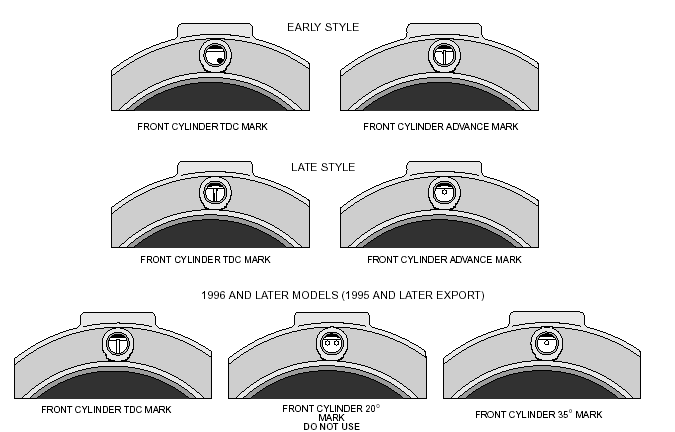
Anyway, the aftermarket plug is shorter than the dealer plug, and I could clearly see the 2 dots in the window. At idle, they were pretty much centered. When I reved it, they moved to the right and only one stayed visible.
I'm going out to do the adjustment now.... had to wait for my son. Will report in a second or 2.
When I got home tonight, I took another shot at it. I used the aftermarket clear plug that I bought. I sent the one I bought from the dealer to THC. He likes surplus parts.
Anyway, the aftermarket plug is shorter than the dealer plug, and I could clearly see the 2 dots in the window. At idle, they were pretty much centered. When I reved it, they moved to the right and only one stayed visible.
I'm going out to do the adjustment now.... had to wait for my son. Will report in a second or 2.
Thread Starter
|
Seasoned HDF Member
Joined: Sep 2010
Posts: 10,237
Likes: 799
From: Indiana
Somebody PLEASE tell me I got it right.........
When I rev it now, the timing marks stay centered in the hole. I had to turn the timing plate thing 3 full marks counter clockwise.
Is that enough to affect the way she runs?
When I rev it now, the timing marks stay centered in the hole. I had to turn the timing plate thing 3 full marks counter clockwise.
Is that enough to affect the way she runs?
Dirt don't hurt


Joined: Jan 2011
Posts: 21,065
Likes: 4,561
From: Haslet Texas
The short answer is yes it is enough to affect the way she runs.

Road Master
Joined: Jan 2008
Posts: 1,187
Likes: 8
From: Montgomery, AL
Trending Topics

Club Member
Joined: Apr 2011
Posts: 5,803
Likes: 7,829
From: SE Louisiana

The timing should have the 20* mark centered at 1050-1500 rpm(page 8-1, and page 8-10-paragraph #'s 5&6 in book #99482-98).
3 notches counter-clockwise is a good bit of retard, sounds like it was set right before, when the advance marks where centered at up to 1500rpm, then move to the right when reved, because it was advancing like it should.
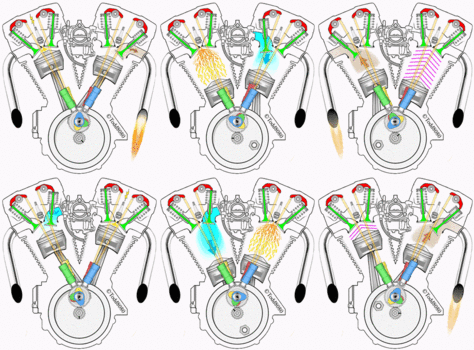
The stock ignition should be set to 20* at 1050 to 1500rpm, then the ignition module will take care of the advance anywhere from 0*at startup, up to 42.5*depending on rpm and VOES inputs.
SOOOOOO, I think it was right before, did you happen to mark it before turning?
3 notches counter-clockwise is a good bit of retard, sounds like it was set right before, when the advance marks where centered at up to 1500rpm, then move to the right when reved, because it was advancing like it should.
The stock ignition should be set to 20* at 1050 to 1500rpm, then the ignition module will take care of the advance anywhere from 0*at startup, up to 42.5*depending on rpm and VOES inputs.
SOOOOOO, I think it was right before, did you happen to mark it before turning?
Last edited by Schex; Apr 29, 2014 at 10:26 PM.
HD Forum Stories
The Best of Harley-Davidson for Lifelong Riders

7 Surprising Harley-Davidson Products that Are Not Motorcycles
Verdad Gallardo
8 Best Harley-Davidson Motorcycles Ever
Pouria Savadkouei
10 Worst Harley-Davidson Motorcycles Ever
Pouria Savadkouei
Killer Custom's Jail Break Is The Breakout That Refused to Blend In
Verdad Gallardo
Crazy Bunderbike Build Looks Amazing, But Is It Impossible to Ride?
Verdad Gallardo
Harley-Davidson Reveals Super Cool Cafe Racer Concept
Verdad Gallardo
Engraved Rebellion: Inside Bundnerbike's Glam Rock II
Verdad Gallardo
10 Motorcycles You Should Never Buy
Joe Kucinski
10 Things Harley-Davidson Needs to Fix in 2026
Verdad Gallardo
Tourer
Joined: Mar 2014
Posts: 351
Likes: 0
From: Colorado
The timing should have the 20* mark centered at 1050-1500 rpm(page 8-1, and page 8-10-paragraph #'s 5&6 in book #99482-98).
3 notches counter-clockwise is a good bit of retard, sounds like it was set right before, when the advance marks where centered at up to 1500rpm, then move to the right when reved, because it was advancing like it should.
The stock ignition should be set to 20* at 1050 to 1500rpm, then the ignition module will take care of the advance anywhere from 0*at startup, up to 42.5*depending on rpm and VOES inputs.
SOOOOOO, I think it was right before, did you happen to mark it before turning?
3 notches counter-clockwise is a good bit of retard, sounds like it was set right before, when the advance marks where centered at up to 1500rpm, then move to the right when reved, because it was advancing like it should.
The stock ignition should be set to 20* at 1050 to 1500rpm, then the ignition module will take care of the advance anywhere from 0*at startup, up to 42.5*depending on rpm and VOES inputs.
SOOOOOO, I think it was right before, did you happen to mark it before turning?

Road Master

Joined: Sep 2013
Posts: 1,054
Likes: 441
From: Tejas
I do mine a little differently when I set them up to start with.
With the primary cover off I set it to TDC and mark the rotor with clear fingernail polish at the three o'clock position. And do the same for all the timing marks.
The shovels had the internal oiler barb I would use as a reference point inside the inner, but you can make a mark of your own at 3 o'clock on the inner to match up.
Now when you want to check the timing, just pull the inspection cover and shoot the light at the rotor and watch your marks as you move the plate.
Griz
With the primary cover off I set it to TDC and mark the rotor with clear fingernail polish at the three o'clock position. And do the same for all the timing marks.
The shovels had the internal oiler barb I would use as a reference point inside the inner, but you can make a mark of your own at 3 o'clock on the inner to match up.
Now when you want to check the timing, just pull the inspection cover and shoot the light at the rotor and watch your marks as you move the plate.
Griz